Job management software for gas engineers
One landlord gas safety check, followed from the renewal reminder to the paid invoice.
A reminder before the certificate runs out
Jobivo sends a notification before an issued certificate’s next check date, to the engineer who issued it and to everyone who manages certificates. You choose how far ahead: 1, 3, 7, 14 or 30 days.
Certificate due for renewalLandlord / Home Owner Gas Safety Record CP12-2500061 at Flat 2, 14 Sample Street is due in 14 days.
| Certificate | Status | Next check | ||
|---|---|---|---|---|
| Landlord / Home Owner Gas Safety Record CP12 | Issued | JB-0287 | Priya Shah | 8 Oct 2026 |
The landlord is the customer and the flat is the site
Each rented property is a site under the landlord, with its own contact, access notes, appliances and dates. A landlord with ten flats is one customer with ten sites.
Book the visit and email the landlord the time
The job is created from your own gas safety check template, with the flat as its address. Booking the visit emails the landlord the arrival window, then reminds them 48 and 24 hours before. They confirm, or ask for another time, from the link.
The job sheet at the flat
The tasks come from the template, so every safety check runs in the same order. Tick each one as it is done. Photos of the analyser reading and the flue are taken on the task they belong to. Tasks and photos are saved on the phone when there is no signal.
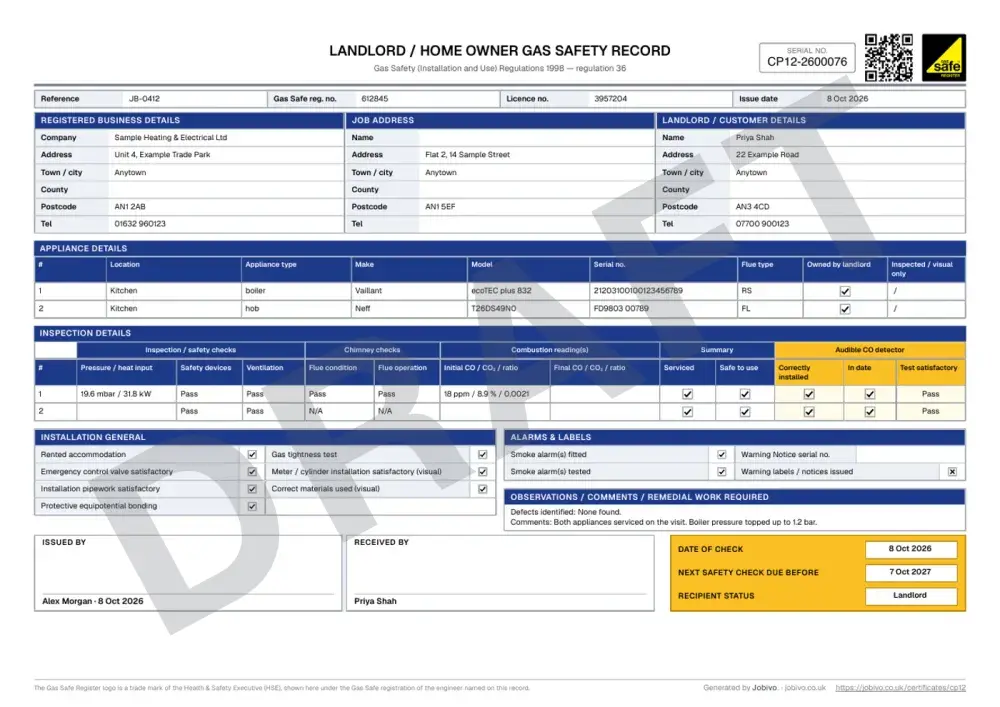
The gas safety record, filled in on the phone
Last year’s boiler and hob are listed under At this property, so they are picked, not typed. Every result starts blank. The landlord, agent or tenant signs on the screen as Received by, and the record is issued with your Gas Safe numbers on it.
An unsafe appliance gets a Gas warning notice from the same job.
The certificate goes out with the invoice
- 1. Raise the invoice on the job. On the issued certificate, choose Add to INV-0318.Issued 8 Oct 2026 by Alex Morgan · Gas Safe 61284509:41CP12-2600076IssuedShareDownload PDFView entriesAdd to INV-0318
- 2. It is listed under Attachments on the invoice.Invoice INV-0318Priya Shah · JB-0412Landlord gas safety check£75.00Boiler service£60.00Subtotal£135.00VAT£27.00Total£162.00AttachmentsCertificates and documents that ride this invoice’s email as PDFs.CP12 ×+ Add attachment
- 3. The email carries the invoice and the certificate as PDFs.Invoice INV-0318 from Sample Heating & Electrical LtdTo Priya ShahSample Heating & Electrical Ltd has sent you an invoice for Landlord gas safety check. The full invoice is attached as a PDF.The amount due is £162.00, payable by 15 October 2026.Pay invoiceInvoice · PDFCP12 · PDF
- 4. The landlord pays from the link, and the page shows it paid. The certificate is on the same page.Sample Heating & Electrical LtdInvoice INV-0318Paid in full on 9 Oct 2026. Thank you!Invoice INV-0318Landlord gas safety check£75.00Boiler service£60.00Subtotal£135.00VAT£27.00Total£162.00CertificatesLandlord / Home Owner Gas Safety Record · CP12 · CP12-2600076Download PDF Paid in full£162.00
Invoices and their payments are pushed to Xero or QuickBooks.Invoices
Invoices and their payments are pushed to Xero or QuickBooks.Invoices
Next year's date is on the flat
Each appliance shows the certificate it was last seen on and when it is next due. The date turns amber 30 days before and red once it has passed.
The other gas work in the week
Boiler and gas service record
Service, breakdown or repair with combustion readings, from the same job as the safety check.
Gas warning notice
For an unsafe appliance, signed by the person responsible or marked as refused.
Commissioning records
Boiler commissioning checklist, central heating commissioning (CP20) and the unvented cylinder record.
Commercial gas forms
Commercial kitchen (CP42), boiler service (CP15), tightness test and purge (CP16) and safety report (CP17).
All twelve gas forms Boiler swaps and bathrooms: the Plumbers page
Try Jobivo free for 14 days.
No card required. Set up in minutes.
Gas engineer software built around the certificate
Gas work ends in a record. A service, a landlord check, a boiler installation or a catering inspection all finish with a form that has to be accurate and findable years later. In Jobivo the job runs from a job sheet built from your own template, and the certificate is filled in on the same job, on the phone, section by section. Every result starts blank and is recorded by the engineer.
Invoicing is part of the same job. Raise the invoice on the phone or in the web app, add the issued certificate to it, and the landlord gets both as PDFs with a link to pay. Invoices and their payments are pushed to Xero or QuickBooks.
For sole traders and small gas and heating firms
Jobivo is priced per company: Essentials is £29.99 a month, Business is £59.99 and Pro is £99.99. Every plan has unlimited users and unlimited jobs. Essentials covers the gas certificates, renewal reminders, job sheets, quotes, invoices and card payments, and Xero or QuickBooks sync starts on Business. On the Android and iOS apps, tasks, photos and a certificate being filled in are saved on the phone when there is no signal and sent when it returns. Issuing a certificate needs a connection.
Jobivo produces the record. It does not replace your registration. You still work within your Gas Safe registration and notify Building Regulations work the way you do now.
Common questions
Is Jobivo suitable for a one-engineer Gas Safe registered business?
Yes. Essentials at £29.99 a month covers the CP12 and the other gas records, renewal reminders, job sheets, quotes, invoices and card payments. The price is per company, so it stays the same when you take on another engineer. The 14-day free trial covers jobs and drafts for your whole company without a card. Customer outputs require a confirmed subscription. A sole trader uses the same certificates, job sheets and invoicing as a larger firm.
Does Jobivo remind me when a gas safety certificate is due?
Yes. A notification is sent before an issued certificate's next check date, to the engineer who issued it and to everyone who manages certificates. You choose 1, 3, 7, 14 or 30 days ahead. The reminder goes to your firm, not to the landlord.
Does each property keep its own certificate history?
Yes. Each property is its own site under the customer, with its own contact, access notes and appliances. Each appliance shows the certificate it was last seen on and when it is next due.
What happens to the paperwork if I lose signal on site?
Tasks, photos and the certificate you are filling in are saved on the phone and sent when you are back in coverage. Issuing the certificate needs a connection.
Which gas records can I issue?
Twelve: the landlord and home owner gas safety record (CP12), service record, warning notice, boiler commissioning checklist, tightness test and purge record (CP32), appliance installation record, unvented cylinder record, central heating commissioning record (CP20), commercial kitchen record (CP42) and three commercial forms (CP15, CP16, CP17).
Can I quote a boiler installation in the same system?
Yes. Quotes can be accepted online, with the lines typed in or, on Business and Pro, picked from your price book. The Plumbers page follows a callout and covers boiler swaps and bathrooms.
Last updated